Certificate of Occupancy
The Certificate of Occupancy must be issued and posted at the site address of the project before commercial business operations may commence at the site, such as selling food products or other commercial activities.
Inspection Process
- A checklist will be posted by the building inspector at the first inspection
- The checklist will show various inspections and agencies responsible to perform those inspections as designated by the managing jurisdiction (city or county)
- The Project Manager is responsible to schedule each of the inspections
- The Superintendent is responsible to:
- Meet the inspector
- Identify any barriers to an inspection approval
- Remediate issues
Obtaining the Certificate
Once all inspections have been completed and there is a signature from each applicable inspector for each inspection:
- The Project Manager should take the signature form to the managing jurisdiction (county or city hall)
- Request the Certificate of Occupancy
Documentation and Posting
Project Files
- The PM must make a copy of the Certificate of Occupancy
- Store in OVI General Contracting company project files in OneDrive:
- Path:
/Docbase/03. Current Projects/P25XXX Project Name/Permits C of O
- Path:
Site Posting
- The PM must post the physical copy of the Certificate of Occupancy at the place of business
- Inform the owner of the posting
Example Certificate
Below is an example of a Commercial Certificate of Occupancy from the City of Star, Idaho:
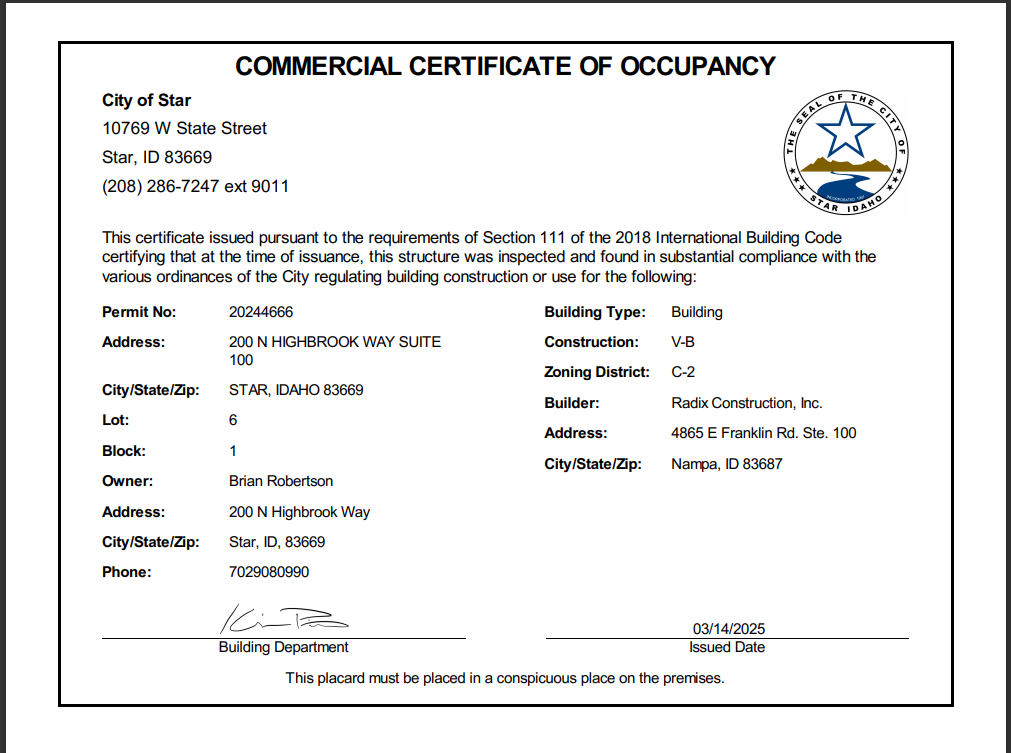
Key components of the certificate include:
- Permit Number
- Building Type and Construction Class
- Property Information (Address, Lot, Block)
- Owner Details
- Builder Information
- Zoning District
- Building Department Signature
- Issue Date
note
The certificate must be placed in a conspicuous place on the premises as stated on the document.
Checklist
- Schedule all required inspections
- Complete all inspections with passing results
- Obtain all required inspector signatures
- Submit completed signature form to jurisdiction
- Receive Certificate of Occupancy
- Make copy for project files
- Post original at business location
- Notify owner of posting